Razer Synapse Wikiindependent compatibility guide
English
Verified Razer Synapse download guide

Razer Synapse Download & Compatibility Finder

Choose the correct Razer Synapse download before you install. This browser-based finder compares Synapse 4, the former Synapse 3 path, legacy Synapse 2, the Mac Preview and Synapse Web using current Razer platform information.

We are not affiliated with Razer Inc. We do not host installers; download links open Razer-owned sources after a short confirmation countdown.

Windows 11 / 10Synapse 4Current Windows path
macOS 15+Mac PreviewApple silicon only
Synapse 3 searchMoves to 4Official product URL redirects
Legacy systemsSynapse 2Exact device match required
Interactive version checker

Find the right Razer Synapse download

Choose your operating system and goal. Add a device name or RZ model number for an extra compatibility reminder.

Runs locally in your browser
Your recommendation will appear here

The result includes platform requirements, the reason for the recommendation, and a verified Razer source link when one is available.

Verified platform choices

Razer Synapse download options

Razer now separates the current Windows app, a Mac Preview, a limited browser experience and the older Synapse 2 product. Select the path that matches both your computer and your exact Razer device.

Current

Synapse 4 for Windows

The main Razer Synapse download for current Windows computers. Razer states that Synapse 4 is backwards compatible with Synapse 3 devices listed on its current support page.

System
Windows 11 x86-64 or Windows 10
Best for
Current supported mice, keyboards, headsets, laptops and accessories
Download for Windows Windows download details
Preview

Synapse for Mac

The official Mac Preview brings device configuration, macros and profiles to supported Apple silicon Macs. It does not support every Mac or every Razer device.

System
macOS 15 Sequoia or later; Apple silicon
Best for
Supported Razer hardware on a current M-series Mac
Download for Mac Mac requirements and limits
Legacy

Razer Synapse 2

Synapse 2 remains on Razer's website for older supported hardware. Its listed systems are historical, so choose it only when your exact device and operating system require the legacy branch.

System
Windows 7/8/10 or Mac OS X 10.10–10.14
Best for
Legacy devices that are not served by the current Synapse 4 path
Download Synapse 2 for PC Synapse 2 versions and specs
Limited

Razer Synapse Web

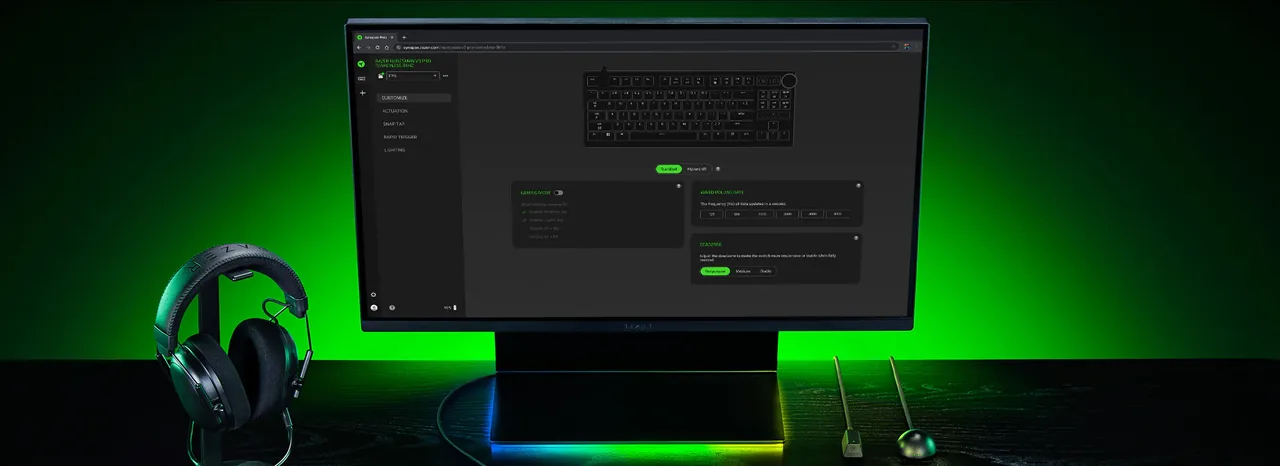
Synapse Web provides quick browser-based customization for selected devices. It can change on-board profiles and some Chroma effects, but it is not the full desktop application.

System
Compatible browser, supported device and current firmware
Best for
Quick adjustments without installing the desktop app
Open Synapse Web See what Synapse Web can do
Version decision

Razer Synapse 4 vs 3 vs 2

The version number alone is not enough. The correct choice depends on the official product path, your operating system and whether your exact device appears in the relevant compatibility list.

VersionCurrent statusPlatformsBest use
Synapse 4Current Windows release; Mac Preview also availableWindows 11/10; macOS 15+ Apple siliconMost currently supported Razer devices
Synapse 3Former product URL redirects to Synapse 4Migration path on WindowsUsers moving profiles, macros and Chroma effects to Synapse 4
Synapse 2Legacy download page remains availableWindows 7/8/10; Mac OS X 10.10–10.14Older compatible devices and historical systems

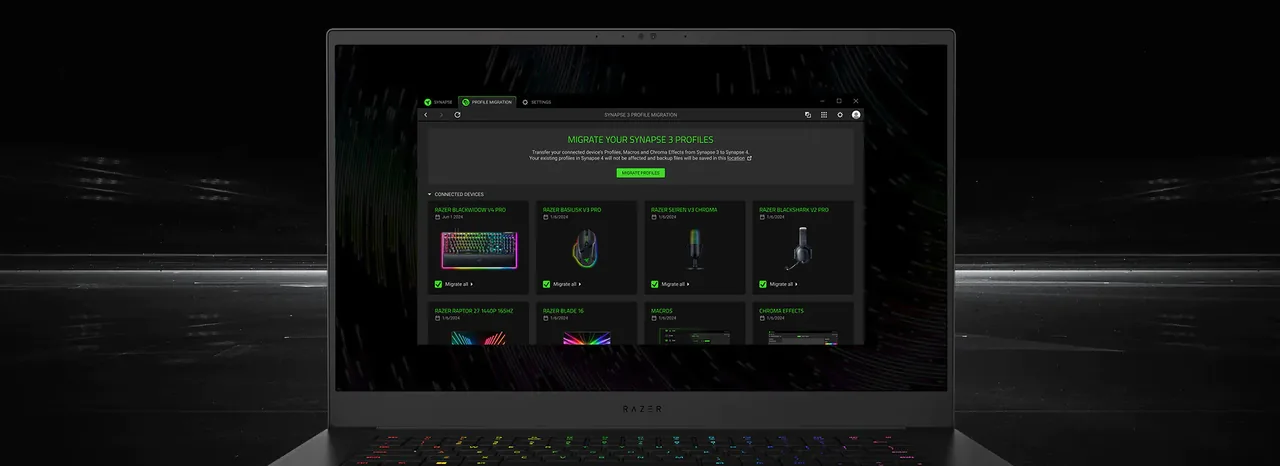
If you searched for Razer Synapse 3 download, do not assume that a third-party Synapse 3 installer is the correct answer. Razer's former /synapse-3 product URL currently resolves to the Synapse 4 page. Razer also says Synapse 4 includes a profile migration tool that can detect Synapse 3 profiles, macros and Chroma effects.

Synapse 2 is different: Razer still publishes a dedicated product page with PC version 1.18.21, Mac version 1.42, listed file sizes and historical operating-system requirements. That does not mean every old Razer product needs Synapse 2. Check the model number before using a legacy installer.

Device-level confirmation

Check Razer Synapse supported devices

Razer's current Synapse 4 support page groups compatible products into laptops, desktops, PC components, mice, mats, keyboards, headsets and audio, controllers, monitors, broadcaster products, chairs, accessories and gamer-room devices. The official list includes both product names and model identifiers such as RZ01-04630.

Model numbers matter because names such as DeathAdder, Basilisk, BlackWidow and Viper span several generations. Two products from the same family can require different software. Use the finder above for a platform recommendation, then confirm the exact model on the official list before downloading.

  • Search the full product name, not only the family name.
  • Match the RZ model number when it is printed on the device label.
  • For Mac, use Razer's separate and continually expanding Mac supported-device list.
  • For Synapse Web, confirm the device on the dedicated browser compatibility page.
Open the Supported Devices Guide
Installer safety

Use the official Razer source

Queries for an offline installer, GDrive copy, torrent, GitHub mirror or random EXE often appear when an ordinary installation fails. Those sources can be stale, modified or unrelated to the required device branch. This site deliberately sends download actions to Razer-owned pages and services.

We do not label a file as safe, scanned, latest or official unless the current first-party page supports that statement. Razer's Synapse 4 page does not expose a simple public version number or file size in its visible product facts, so this guide does not invent either value.

  • Do not download a file only because its name resembles RazerSynapseInstaller.exe.
  • Avoid disabling antivirus permanently to force an installer to run.
  • Confirm Windows architecture, available storage and pending restarts first.
  • If a verified Razer link changes, use the linked product page rather than searching for a mirror.

Official Razer Synapse Web setup showing browser-based device customization
Synapse Web quick customizationOfficial Razer media shows selected device controls running in a browser. Availability still depends on the web compatibility list and current device firmware.Source: Razer Synapse 4
Official Razer Synapse 4 profile migration interface
Synapse 3 profile migrationThe Synapse 4 migration tool is designed to bring selected Synapse 3 profiles, macros and Chroma effects into the current app.Source: Razer Synapse 4
Practical setup

How to download and install Razer Synapse

A clean installation starts with the correct branch. Use these steps after the finder identifies the likely version, and stop if the operating system or model does not match the official requirements.

  1. 1
    Identify the operating system and architecture

    Confirm whether the computer runs Windows 11, Windows 10, an older Windows release, or macOS. Mac Preview requires Apple silicon and macOS 15 or later.

  2. 2
    Confirm the exact device

    Search the full product name or RZ model number on the relevant official compatibility list. Do not decide from the product family alone.

  3. 3
    Open the verified Razer download

    Use the platform button on this page. The countdown makes the external transition clear; the installer is served by Razer, not this site.

  4. 4
    Run the installer and select modules

    Follow the Razer installer prompts. Allow requested device components to finish before unplugging hardware or restarting the application.

  5. 5
    Test recognition and migrate profiles

    Open Synapse, sign in only if required for the features you use, verify the device appears, and use Synapse 4's migration tool when moving from Synapse 3.

Use this verified Razer Synapse download guide when the installer loops, creates an ERR file, closes unexpectedly or never recognizes the device. First reboot after pending Windows updates, disconnect unnecessary peripherals, verify available disk space and run the current installer from the verified product page. Repeated mirror downloads usually do not address the underlying service, permissions or driver problem.

The Mac Preview and Synapse Web have narrower support boundaries. A successful download does not prove that a particular device is compatible. Treat the supported-device page as the final model-level check.

Troubleshoot a Razer Synapse download or installation
Direct answers

Verified Razer Synapse download guide FAQ

Where should I download Razer Synapse?

Use Razer's current Synapse product page or the verified Razer short links surfaced by this guide. The Windows link points to Synapse 4, the Mac link points to the official Mac Preview, and legacy Synapse 2 uses Razer's dedicated older product page.

Can I still download Razer Synapse 3?

Razer's former Synapse 3 product URL currently redirects to Synapse 4. Razer describes Synapse 4 as backwards compatible with devices on its Synapse 4 list and provides a migration tool for Synapse 3 profiles, macros and Chroma effects. Avoid assuming an old third-party installer is required.

Does Razer Synapse work on Windows 11?

Razer lists Windows 11 x86-64 for Synapse 4. You still need a supported Razer device. Use the Windows 11 guide and official device list to confirm the complete combination.

Can I download Razer Synapse for Mac?

Yes, Razer currently offers Synapse for Mac Preview. Its published requirement is macOS 15 Sequoia or later on a Mac with Apple silicon, and only devices on Razer's current Mac support list should be treated as compatible.

Is there a Razer Synapse offline installer?

Do not assume a file advertised by a mirror is an official offline installer. Synapse 2 says an internet connection is needed to activate full features and updates, after which optional offline mode is available. This guide links only to verified Razer sources.

Does Razer Synapse work on Chromebook or Linux?

Razer does not present a full Chromebook or Linux desktop build on the current Synapse 4 page. Some devices may support limited browser-based controls through Synapse Web. Confirm the exact device on Razer's web compatibility list.

Do I need Synapse 2, 3 or 4 for my mouse or keyboard?

The product family is not enough to decide. Choose the operating system, search the exact model or RZ number, and use the current supported-device list. Current supported Windows hardware generally follows Synapse 4; Synapse 2 is a legacy branch.

Why is Razer Synapse not downloading or installing?

Common causes include an unsupported operating system, wrong architecture, an incompatible device branch, pending restart, insufficient permissions, security software interference or damaged installer state. Use the troubleshooting page before searching for an unofficial mirror.

Leaving this site

Opening a verified Razer source

The link will open the Razer download or service page after the countdown. We do not host or modify the installer.

15

Redirecting in {seconds} seconds.