Razer Synapse Offline Installer: Official Setup Guide
The current Razer Synapse path uses a maintained installer that can retrieve selected software and modules. A universal full offline package was not verified on the public first-party pages checked August 13, 2026, so plan a connected setup and avoid mirror EXE files.
Verified August 13, 2026: Razer's Synapse 4 product, installation, release-note and support pages were checked August 13, 2026. They do not verify a universal full offline bundle.
Choose your operating system and goal. Add a device name or RZ model number for an extra compatibility reminder.
Runs locally in your browser
Your recommendation will appear here
The result includes platform requirements, the reason for the recommendation, and a verified Razer source link when one is available.
Offline installer facts
What Razer currently publishes
Checked Aug 13, 2026
Official Windows source
Razer Synapse 4 product page and the Razer-owned rzr.to download link
Public full offline bundle
Not verified on the checked Razer product, install, or supported-device pages
Internet requirement
Plan for a connection because setup can fetch selected apps, services, drivers, and modules
Published version and file size
Synapse 4 Windows build v4.0.86.2608040510; maintained installer Range check 14,919,368 bytes. These facts do not establish a universal offline bundle.
Supported systems
Windows 11 64-bit or Windows 10; Mac uses a separate Preview path
Safety boundary
This site does not host, repackage, checksum, or certify Razer installer files
Official setup screens
What the maintained installer flow looks like
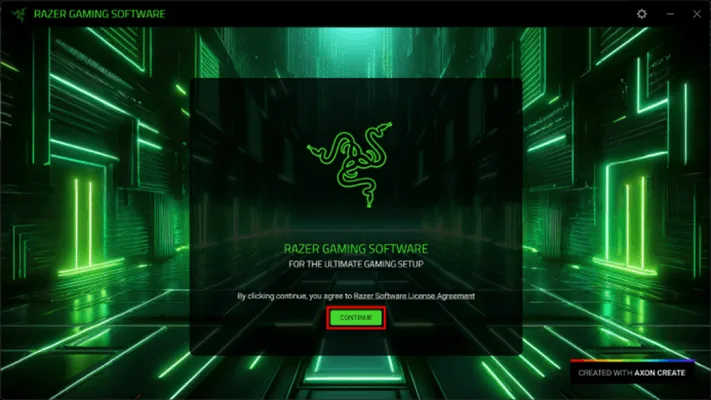
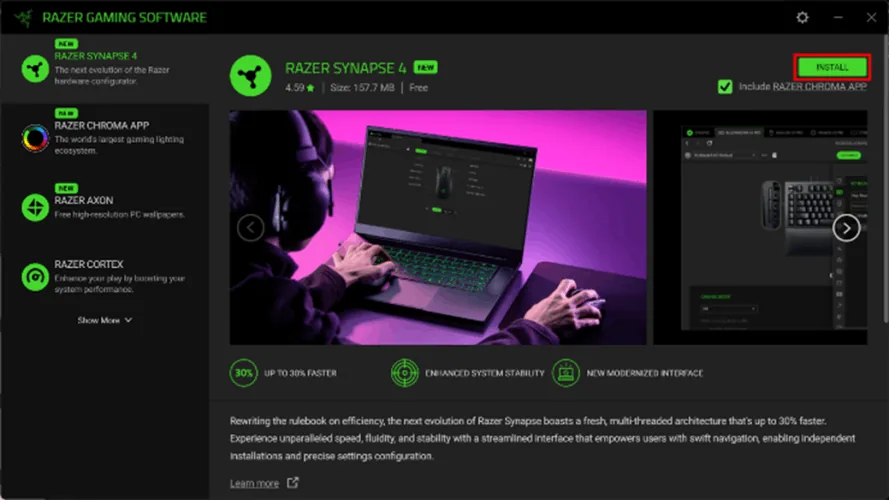
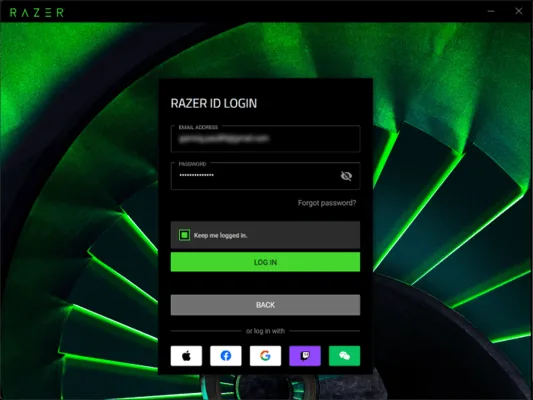
These Razer-hosted screenshots show the public setup sequence. Interface details, version labels, module sizes, and available products can change, so treat them as workflow examples rather than current release metadata.
Start from a Razer-owned pageThe launcher begins the Razer installation flow. A familiar filename or green interface from a mirror does not prove origin.View the official Razer imageSelect only the components you needThe installer can present Synapse, Chroma, Axon, Cortex, or other options. The visible version and size are historical screenshot values, not a current guarantee.View the official Razer imageComplete setup in the installed appSynapse can request sign-in and initialize device-specific components. A copied bootstrap file is not the same as a complete offline deployment.View the official Razer image
Direct answer
Is there an official Razer Synapse offline installer?
The current Razer Synapse path uses a maintained installer that can retrieve selected software and modules. A universal full offline package was not verified on the public first-party pages checked August 13, 2026, so plan a connected setup and avoid mirror EXE files.
The file downloaded first may be an installer or bootstrapper rather than the complete software set. During setup it can retrieve the current components selected for the machine. Keeping that first file does not prove that another computer can finish without internet, and it does not freeze a supported version for future use.
Use the current Razer-owned download link while online.
Do not call a third-party archive official because its filename contains Synapse or Offline.
Do not treat a screenshot's version number or size as current release data.
For managed or restricted networks, ask Razer Support for a supported deployment method.
Meaning of offline
Why offline installer can mean different things
Users often use the same phrase for several needs: download once and install later, deploy to several computers, preserve Synapse 3, bypass a blocked network, or use features without signing in. Those are separate problems and should not be solved with the same unknown EXE.
Bootstrap copy: the first installer is saved, but modules can still download.
Cached installation: temporary packages are not documented as a portable installer.
Enterprise deployment: administrators need supported packaging, logs, allowlists, and update controls.
Legacy preservation: an old filename does not prove authenticity or current support.
Offline use after setup: local settings may work while cloud, account, update, or module functions still need connectivity.
Safe workflow
How to install Synapse safely when internet is limited
Confirm Windows edition and architecture, the exact Razer model and RZ number, storage, administrator permission, and security or proxy rules before launching the official installer. Download from Razer, allow selected components to finish, restart if requested, then test device recognition and the settings you need.
If modules do not download, record the failed stage, error text, timestamp, operating system, network type, and source URL. A proxy, DNS filter, TLS inspection, endpoint security rule, captive portal, or interrupted update can block a maintained installer. That evidence is more useful than repeatedly trying unrelated packages.
Open the product page on a trusted network.
Select the minimum required applications and modules.
Let drivers and services finish before disconnecting hardware or network.
Test profiles, macros, assignments, Chroma, and on-board memory separately.
Legacy queries
What about a Razer Synapse 3 full offline installer?
Searches for a Synapse 3 full offline installer often come from devices or guides that still mention Synapse 3. Razer's former Synapse 3 product path now leads toward Synapse 4, and the current supported-device list should decide whether migration is appropriate. This page does not provide an archived Synapse 3 executable or imply that an old mirror is maintained.
If a device genuinely requires Synapse 2 or another legacy path, verify the exact model and preserve important profiles before changing branches. Running several generations or forcing repackaged drivers can create service conflicts without solving compatibility.
Check the exact device on the current supported-device list.
Use the Synapse 3 migration guide for profiles, macros, and Chroma effects.
Use Synapse 2 only when the model and operating system require it.
Treat portable, cracked, repacked, torrent, and shared-drive installers as unverified.
After installation
Can Razer Synapse work offline after setup?
Installation and daily use are different questions. Once the current software and device modules are installed, some assignments, sensitivity settings, lighting states, or on-board profiles may work without a continuous connection, depending on the device and feature. Account synchronization, cloud profiles, updates, integrations, and some modules can still require internet access.
Before taking a system offline, finish updates, open every needed module, save supported settings to on-board memory where available, restart, and perform a real offline test. Do not assume every feature remains available merely because the application opens.
Test the exact device and feature, not only whether Synapse launches.
Use on-board memory where the hardware supports it.
Record the working Synapse branch and device firmware.
Reconnect periodically for supported updates and security fixes.
Deployment preparation
What to prepare when an offline installer is required
If the goal is a restricted-network or multi-computer setup, record the operating system, exact device, required modules, proxy or allowlist rules, and the point at which the official installer fails. Saving the bootstrap file alone does not prove that every driver, service, language or device module is cached for another computer.
Use Razer's current download page on an approved connection, let the selected components finish, and test the exact device before taking the system offline. For managed deployment, ask Razer for a supported packaging method instead of treating a shared-drive archive as an official offline installer.
Separate a saved bootstrapper from a complete offline package.
Record failed component downloads and network conditions.
Test the device and required features before disconnecting the network.
Safe installation checklist
Use this order instead of an unknown offline bundle
A controlled online installation is safer and easier to diagnose than an unverified third-party package.
1
Verify platform and device
Confirm Windows 10/11 64-bit, the full product name, generation, suffix, and RZ number.
2
Download from Razer
Start from the Synapse 4 product page or Razer-owned short link; avoid ads, mirrors, torrents, and repacked archives.
3
Allow component retrieval
Keep the network stable while selected apps, services, drivers, and modules complete.
4
Validate the result
Restart when requested and test detection, profiles, macros, Chroma, sync, and on-board memory separately.
5
Escalate with evidence
Give Razer Support the source URL, OS, model, RZ number, failed stage, error text, and network conditions.
A controlled online installation is safer and easier to diagnose than an unverified third-party package.
Can I download a full Razer Synapse offline installer?
Razer's release notes list Synapse 4 Windows build v4.0.86.2608040510 and the maintained installer Range check totals 14,919,368 bytes. The checked public pages still do not verify a complete universal offline bundle; use the connected official installer.
Is the Razer Synapse installer completely offline?
Do not assume so. The initial file can retrieve selected apps, drivers, services, and device modules during setup.
Where can I download the official installer?
Use the current Razer Synapse 4 product page or its Razer-owned download link. This site does not host or repackage the installer.
Can I use a Synapse 3 offline installer from a mirror?
A mirror cannot prove that an old package is current, complete, or unchanged. Verify the device and use Razer's migration or legacy guidance.
Will Synapse work without internet after installation?
Some local or on-board settings may work, but account sync, cloud profiles, updates, integrations, and some modules can require connectivity.
Why does the installer need internet?
The maintained installer can retrieve the current selected software, services, drivers, and device modules instead of shipping every component in one public bundle.
Can I use a Razer Synapse 3 full offline installer from a mirror?
A mirror cannot establish that an old Synapse 3 package is current, complete, unchanged, or compatible with the device. Use the current Razer migration and legacy guidance, and ask Razer about supported deployment options when a connected install is not possible.