Razer Synapse 3 Cloud Sync: What Still Works After Shutdown
Razer Synapse 3 cloud sync ended on February 3, 2026. Razer says the app no longer receives updates or cloud services, so configurations no longer sync across PCs. This does not mean every installed device immediately stops working: an already installed device can remain configurable in Synapse 3, and local profiles may still be available on that PC. Cloud data is no longer accessible after the server shutdown. Start by separating a profile stored locally from a cloud copy, and do not remove a working setup before checking for an export or a supported migration path.
Checked November 5, 2026: Razer's February 3, 2026 service retirement date has passed. Cloud access and local device configuration are separate states.
Quick answer
Razer Synapse 3 cloud sync status at a glance
Checked Nov 5, 2026
Cloud services
Ended February 3, 2026; configurations no longer sync across PCs.
Local profiles
May remain accessible in an existing Synapse 3 installation; this is not cloud sync.
Installed devices
A device already installed can remain configurable in Synapse 3.
New hardware
Synapse 3 no longer supports new hardware.
Cloud data
Razer says it is no longer accessible after shutdown.
Migration
Synapse 4 includes a tool for profiles that remain available.
Before changing software
Identify which profile copy you have
Separate local settings, exported files, and cloud-only data before changing software.
1
Local app
Check the PC where Synapse 3 last showed the profile.
2
Export file
Search backups and test any file you saved earlier.
3
Cloud only
Treat it as unavailable after the February 3, 2026 shutdown.
Official interface references
Profile export and migration screens
These Razer interface images help identify the relevant controls. They are references to product screens, not proof that cloud services remain available; labels and layouts can change.
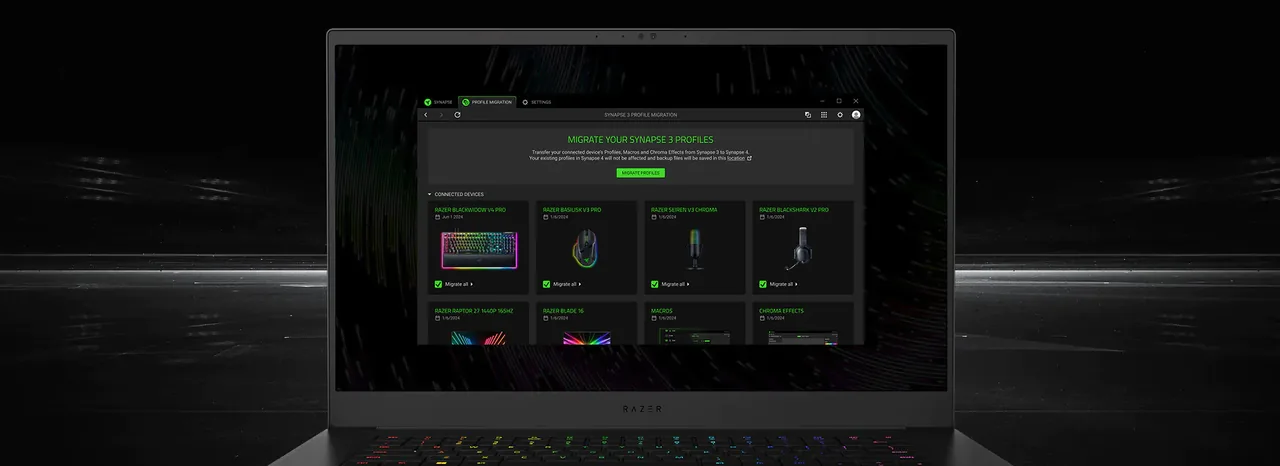
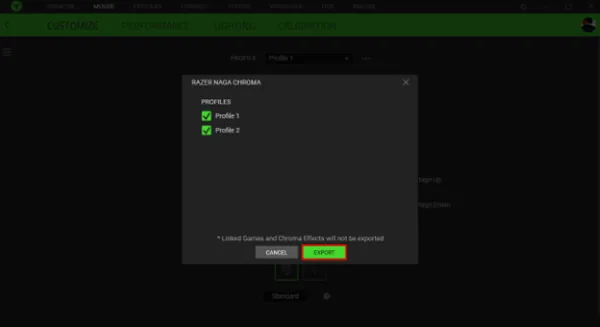
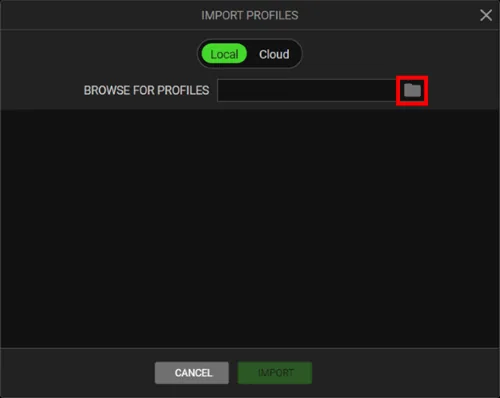
Migrate available profiles in Synapse 4Use the migration flow only after checking which profiles and devices are available. Review the result instead of assuming every setting moved identically.Razer Synapse 4Export a profile that is still available locallyAn export is useful only if the profile is present in the app and the export control is available. Keep the resulting file separate from the Synapse installation.Razer profile instructionsTreat the Cloud selector as historical UIThis older dialog shows a Cloud option, but Razer ended Synapse 3 cloud services on February 3, 2026. Do not treat the screenshot as evidence that the Cloud option still works.Razer profile instructions
Current status
Razer Synapse 3 cloud sync after February 3, 2026
The cutoff is permanent, not a temporary connection error. Razer ended Synapse 3 cloud services and updates on February 3, 2026, so profiles no longer sync between PCs through a Razer ID. Reinstalling or signing in again cannot restore the retired service.
An installed device and a local profile are separate from cloud sync. Razer says an already installed device can remain configurable and local profiles may still open on that PC. Check where each copy exists before changing the setup.
Cloud synchronization across PCs: ended.
A local profile: may still open in its existing Synapse 3 installation.
An already installed device: can remain configurable in Synapse 3.
New or fully removed hardware: check the exact model on the Synapse 4 support list.
Local versus cloud
A profile on your PC is not the same as a cloud backup
A profile visible in the installed application is a local starting point; it does not prove that a copy exists on Razer servers or another PC. Treat the old PC and any export as separate backups.
If an important profile still appears, do not uninstall Synapse or remove its device yet. Use the export control if available, save the file outside the app folder, and keep the original setup until you test the copy. Avoid copying undocumented program folders.
If the only copy was in cloud storage, Razer says it is no longer accessible. Check older PCs and existing exports; signing in, reinstalling, or using a third-party utility cannot restore the retired service.
Protect the old PC
What to do when your Synapse 3 profile still appears
On the PC where the profile was last used, confirm its name and device. Note important assignments, sensitivity, macros, lighting, and app links. Screenshots help as a reference but are not a portable profile file.
Export with Razer's documented control if it is available, give the file a clear name, and keep a second copy outside Synapse folders. Check the full device model against Razer's current Synapse 4 compatibility list before moving.
Use Synapse 4's Profile Migration Tool for available profiles, then test each important assignment, macro, and effect before removing the old copy. The Razer Synapse profiles guide explains export and verification in more detail.
Missing profile
If cloud data or a profile is missing now
Check the PC where the profile was last used. Open Synapse 3 without clearing its data or removing the device, then look in normal folders and external drives for an export. Inspect other PCs you used before replacing or resetting anything.
If no local copy or export exists and cloud storage held the only copy, Razer says that data is no longer accessible. Do not pay a recovery service or share your Razer ID with a site promising to restore it.
If the app opens but a device is missing, confirm whether it was already installed and check its exact model on Razer's supported-device list. Synapse 3 does not support new hardware; a fully removed device needs the Synapse 4 path.
Upgrade decision
Should you keep Synapse 3 or move to Synapse 4?
Keeping a working Synapse 3 installation can provide short-term access to local profiles and devices already installed. It cannot restore cloud sync, receive updates, or configure new hardware.
Synapse 4 is Razer's stated replacement and can migrate available profiles, macros, and Chroma effects. It may not reproduce every option identically, so check compatibility and test one device at a time before removing the old copy.
Use the site's Razer Synapse 4 download guide for the current product path. This article does not claim a build number or installer size.
Avoid extra risk
Do not use an old Synapse 3 installer as a cloud-sync fix
An old installer or mirror cannot restart Razer's cloud servers and may be stale or modified. Razer points users to Synapse 4 after the retirement.
No. Razer ended the cloud service on February 3, 2026, so configurations no longer sync between PCs through a Razer ID.
Can I still use Synapse 3 and my installed device?
Razer says an already installed device can remain configurable and local profiles may still be accessible. The app no longer receives updates or cloud services and does not support new hardware.
Can Razer restore my Synapse 3 cloud data?
Razer says cloud data is no longer accessible after shutdown. Do not assume an account sign-in, reinstall, or third-party tool can recover a cloud-only copy.
Can I migrate an available profile to Synapse 4?
Razer provides a Profile Migration Tool for profiles that remain available. Check device compatibility and test migrated settings before removing the old copy.